 Harbour
Copies you can prove
Harbour is a Mac file manager that checks every byte it copies to a card, drive or NAS before it calls the job done. Copies wait their turn in one queue, a Replace keeps the file it overwrote, and Undo still works after they finish. It also compares two folders side by side, keeps Downloads tidy with folder rules, and can rename your receipts from what they say.
Free 14-day trial. macOS 26, Apple Silicon. Notarised by Apple. New in 1.4: smart naming for receipts. New in 1.3: folder rules.
- IMG_4821.JPG5.2 MBVerified
- IMG_4822.JPG4.9 MBVerified
- IMG_4823.JPG5.6 MBVerified
- take-01.wav212 MBVerified
- take-02.wav198 MBVerified
- press-night.mov1.1 GBVerified
- notes.txt2 KBVerified
How a copy works
Queue
Every job waits its turn, so a NAS never gets hammered by six copies at once.
Copy
Reads and writes stream in parallel; a stuck folder never freezes the window.
Verify
Removable and network destinations are checksummed file by file before Harbour calls it done.
Undo
The Activity log keeps every transfer with a reason, and Undo puts things back. A Replace sends the old file to the Bin first, so it comes back too.
What it’s for
After the shoot
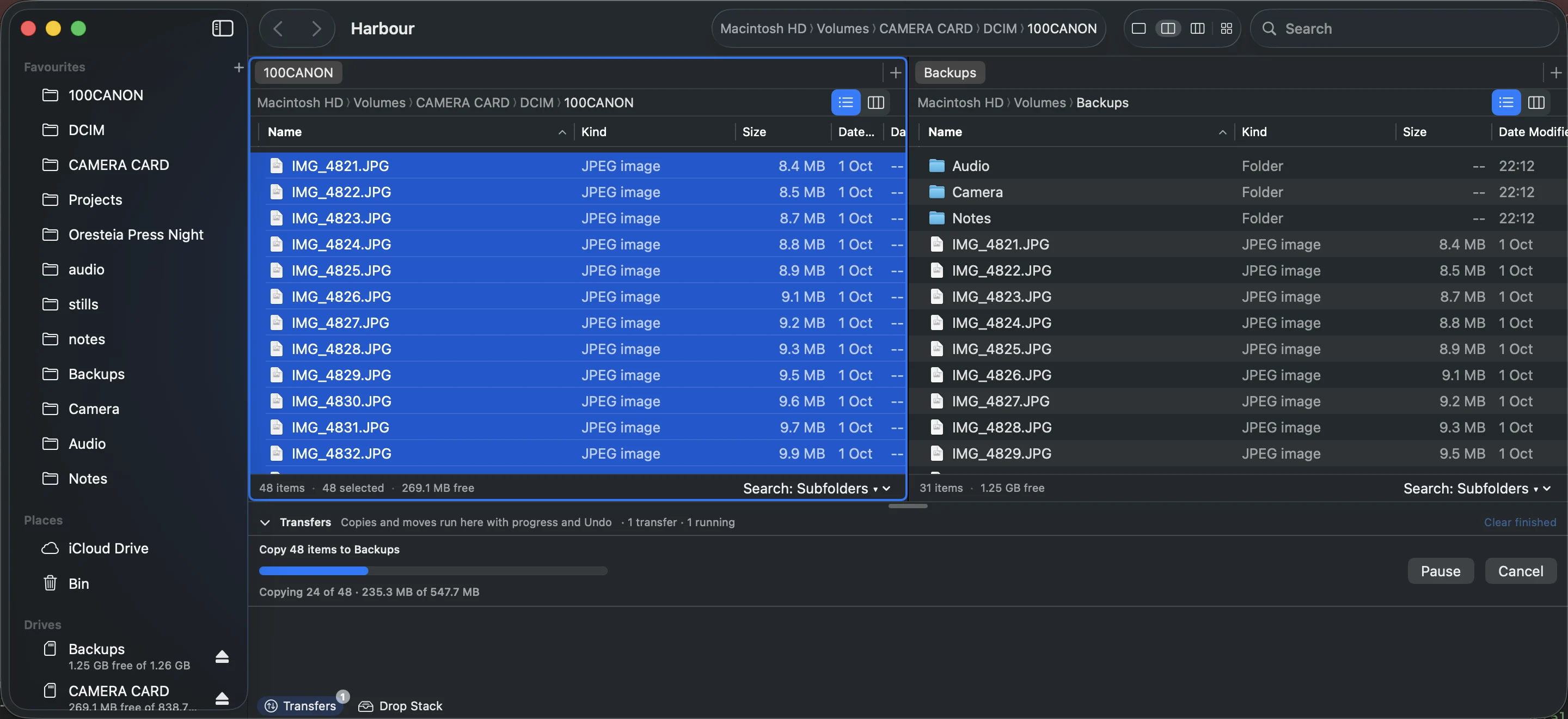
Copy a camera card straight to the NAS. Harbour queues every file, writes it, then reads it back and compares checksums before the job is marked done. When the ledger says verified, the card is safe to format.
Press night
One quick action copies the night's four hours of recording to the NAS and to an external drive, renamed the way the show wants them, and verifies both copies. The Activity log keeps the whole run, so you can say what landed where.
Checking the NAS backup
Open the project folder on one side and its backup on the NAS on the other, then choose Go ▸ Compare with Other Pane. Harbour lines the two up and shows what the backup is missing. Copy all missing sends just those files across, and nothing is deleted from either side.
The Downloads folder
A folder rule waits until an installer or screenshot has sat in Downloads for a few days, then moves it, renames it, tags it or puts it in the Bin. You see what it will do before you turn it on, and every run can be undone from Activity.
Folder rules
Keep a folder like Downloads tidy automatically while Harbour is open. Window ▸ Rules, or ⌃⌘R.
Which files, how long, then what
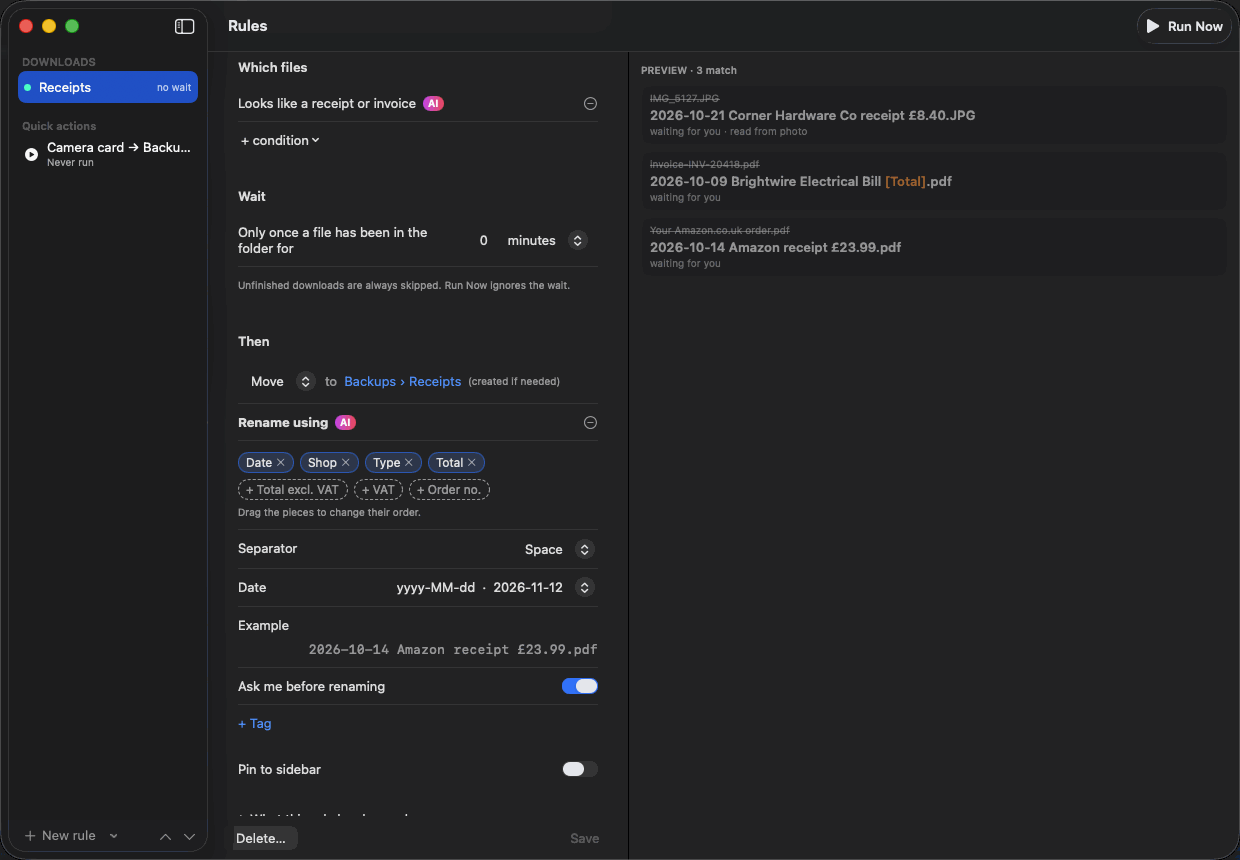
A rule is a folder, which files it applies to (name, extension, kind, size, age, is a screenshot, is a disk image), an optional wait, and what to do: move, copy, rename with a date stamp the way the backup quick actions do, move to the Bin, and/or add a Finder tag. The wait counts from when a file arrived, so only once it has been here 3 days leaves today's downloads alone. A destination subfolder is made if it is not there yet.
See it before it happens
The live preview shows what each rule would do right now, with waiting files greyed out (moves in 23 hrs). Turning a rule on shows you the files already in the folder first and waits for your OK. Choose Ask me before acting and files are held in a Review window with one notification instead.
Careful by default
Unfinished downloads (.crdownload, .part, .download, or a file still growing) are never touched. Each run is one undoable job in Activity, named after the rule. Several rules can share a folder, and the first match wins. Rules on network folders run only when you press Run Now. ⌘Z still undoes your own last action, not a rule's background run.
Comparing ways to do this? Read how to keep your Mac's Downloads folder tidy automatically, including when Hazel is the better pick.
Smart naming for receipts
New in 1.4. A folder rule can read receipts and invoices and rename them from what they say, on your Mac. Invoice-38417.pdf becomes 2026-10-14 Amazon receipt £23.99.pdf.
A name built from pieces you arrange
Pick the pieces and their order: date, shop, type and total, plus, if you want them, the total excluding VAT, the VAT and the order number. 2026-10-14 Amazon receipt £19.99 + £4.00 VAT.pdf is one way to lay it out. Harbour reads the text in PDFs, and photos and scans through on-device text recognition (read from photo). Add the condition Looks like a receipt or invoice and the rule leaves everything else in the folder alone.
It never invents a value
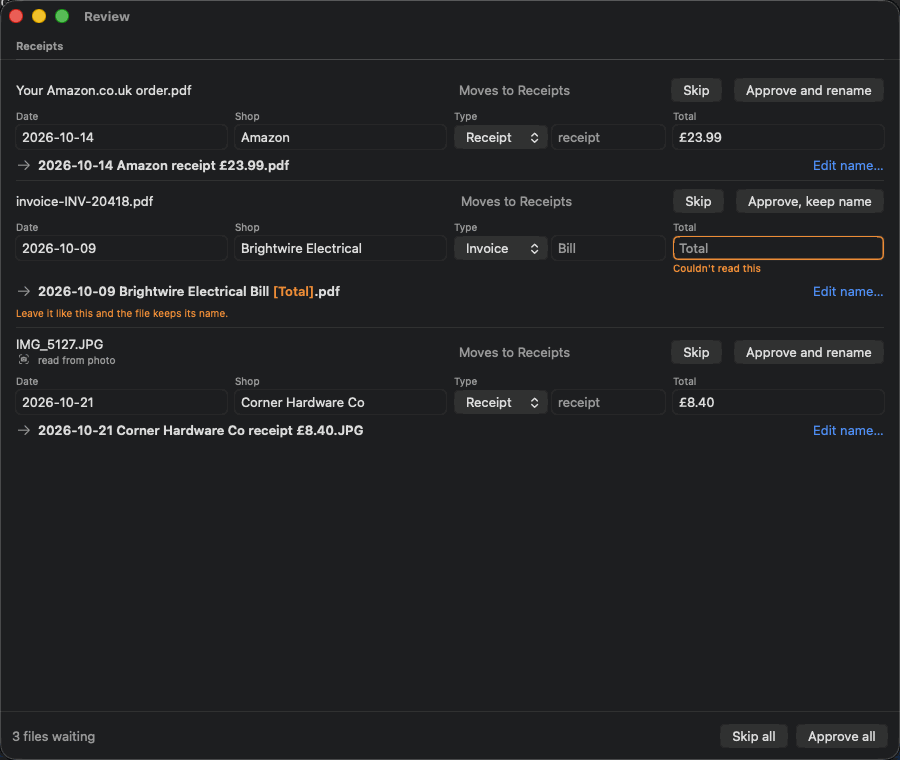
Every date, shop, total and order number has to appear in the document's own text, or it counts as missing. A file with anything missing goes to the Review window with the gap highlighted, and you fill it in or keep the original name. Ask me before renaming is on by default for smart rules: one notification with a Review button, then you see what was read, edit any field, and approve or skip.
Read on your Mac, and it learns from you
Smart naming uses Apple's on-device model (Apple Intelligence), so a receipt is read on the Mac and never sent anywhere. Correct a shop name once (AMZN Mktp UK to Amazon) or a type word, and that rule uses your fix next time. After ten approvals in a row from one shop with no changes, Harbour asks Stop asking about Amazon?, and only your yes changes anything; edit one from that shop later and it goes back to asking. Each rule lists what it has learned, and you can delete any item.
What it needs
Apple Intelligence turned on in System Settings, on a Mac that supports it, in a language and region Apple Intelligence supports. Harbour downloads nothing extra; macOS fetches Apple's model when you turn Apple Intelligence on. Without it, smart naming is greyed out with the reason and the rest of Harbour works as normal. Smart naming reads local folders only, never files on a network drive.
Other ways to do it, by hand, with Shortcuts or with Hazel: how to rename receipts and invoices automatically on a Mac.
Folder Compare
Two folders side by side: your Mac against its NAS backup, two copies of a project, any two folders on any drives. Go ▸ Compare with Other Pane.
What's missing, what's different
Rows line up by path and are marked missing on one side, only on one side, or different, with the newer date in bold. Files that match are hidden unless you show them. Matching uses path, size and modified date, so it stays quick on a NAS, and Verify contents… hashes both sides when you need to be sure. A folder Harbour could not read is shown as couldn't read, never as missing.
Fix it in place
An arrow on each row copies that item across. Copy all missing works in either direction. Newer wins first lists every file it will replace and asks, and each replaced file goes to the Bin or the share's #recycle folder, so Undo brings it back. Compare never deletes anything from either side.
Prefer Terminal? See how to compare two folders on a Mac with diff and rsync.
What else it does
Drop Stack
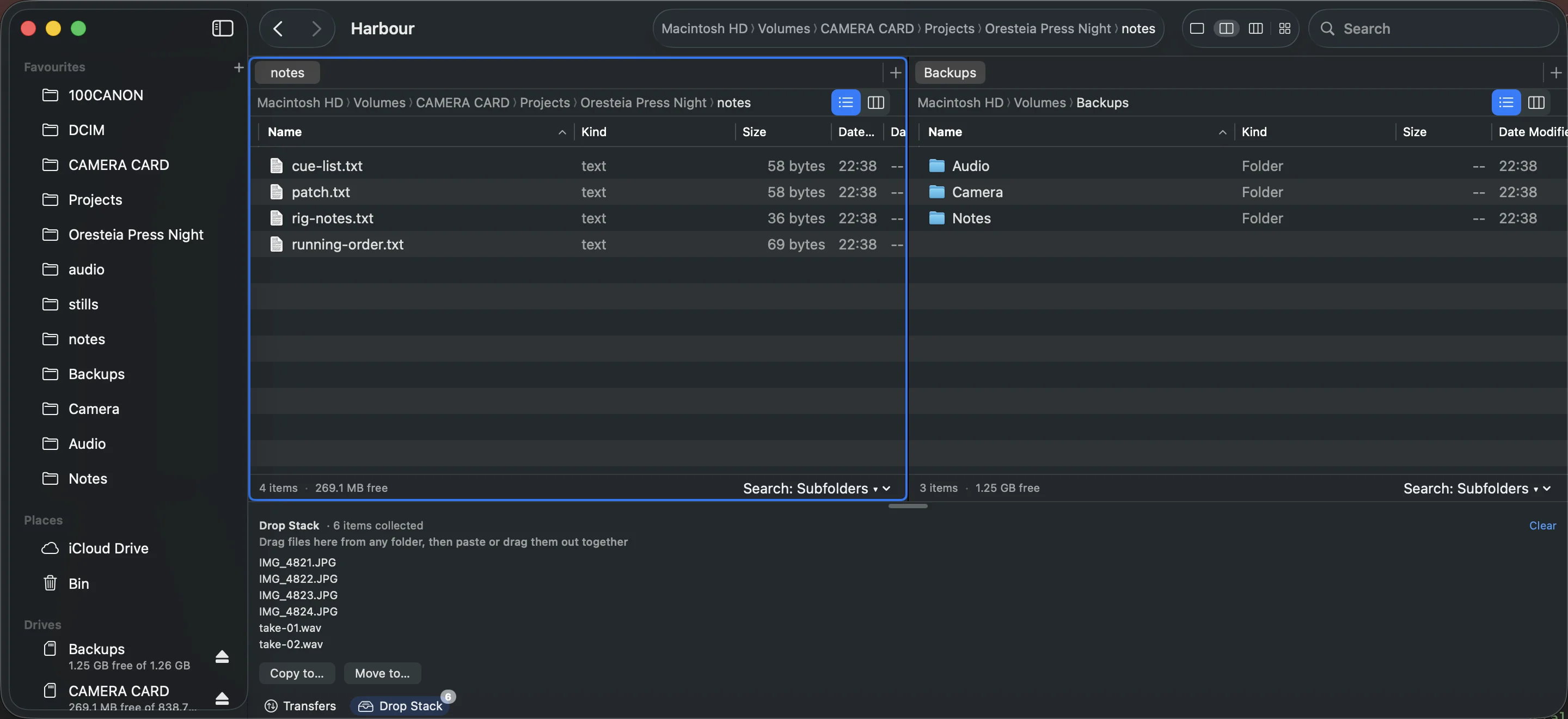
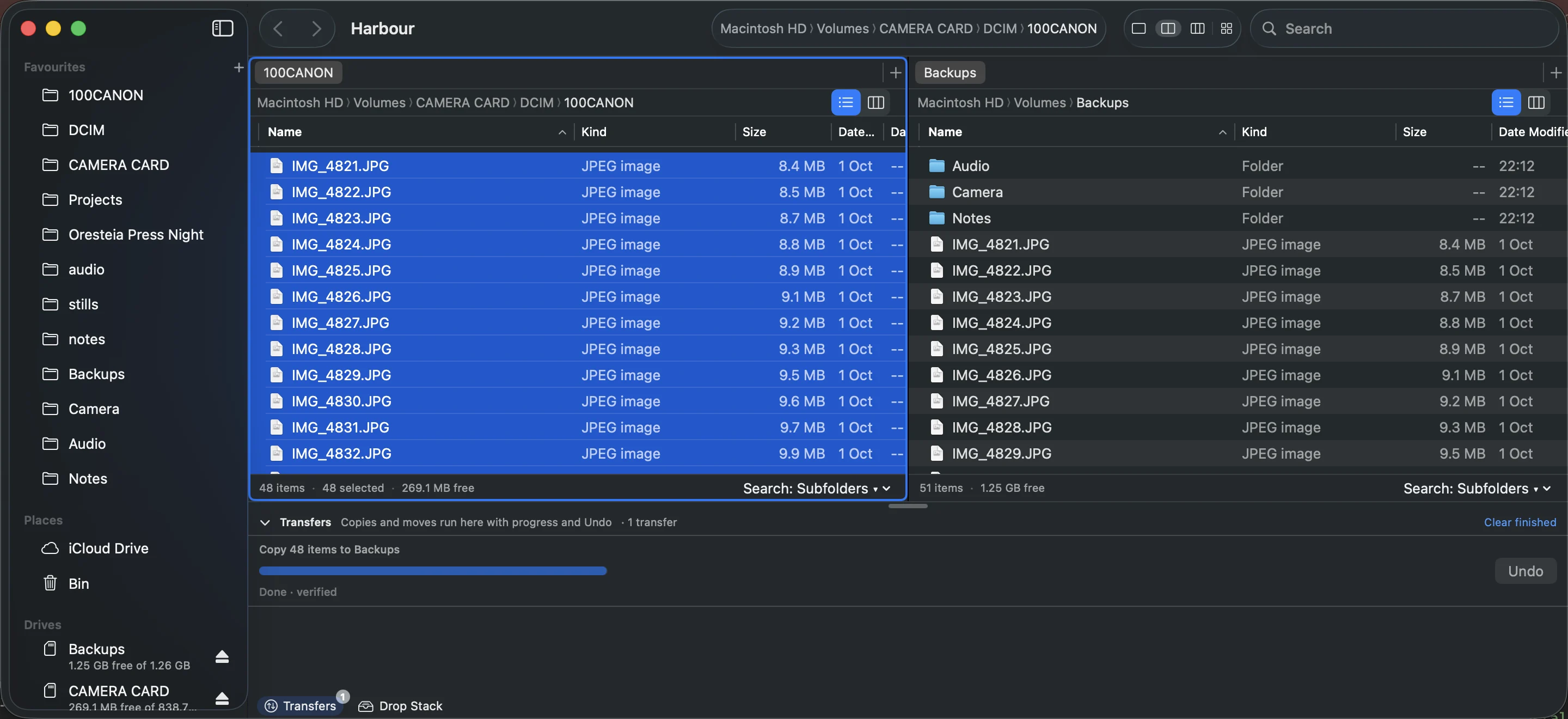
Drag files into the Drop Stack from any folder or pane, or press ⌘⇧S to add the selection. They stay there across navigation and relaunches, with duplicates dropped and the originals untouched. Then press Copy to… or Move to… and click the pane you want: the whole stack goes as one queued, verified job. A copy keeps the stack for a second destination; a move empties it.
Backup quick actions
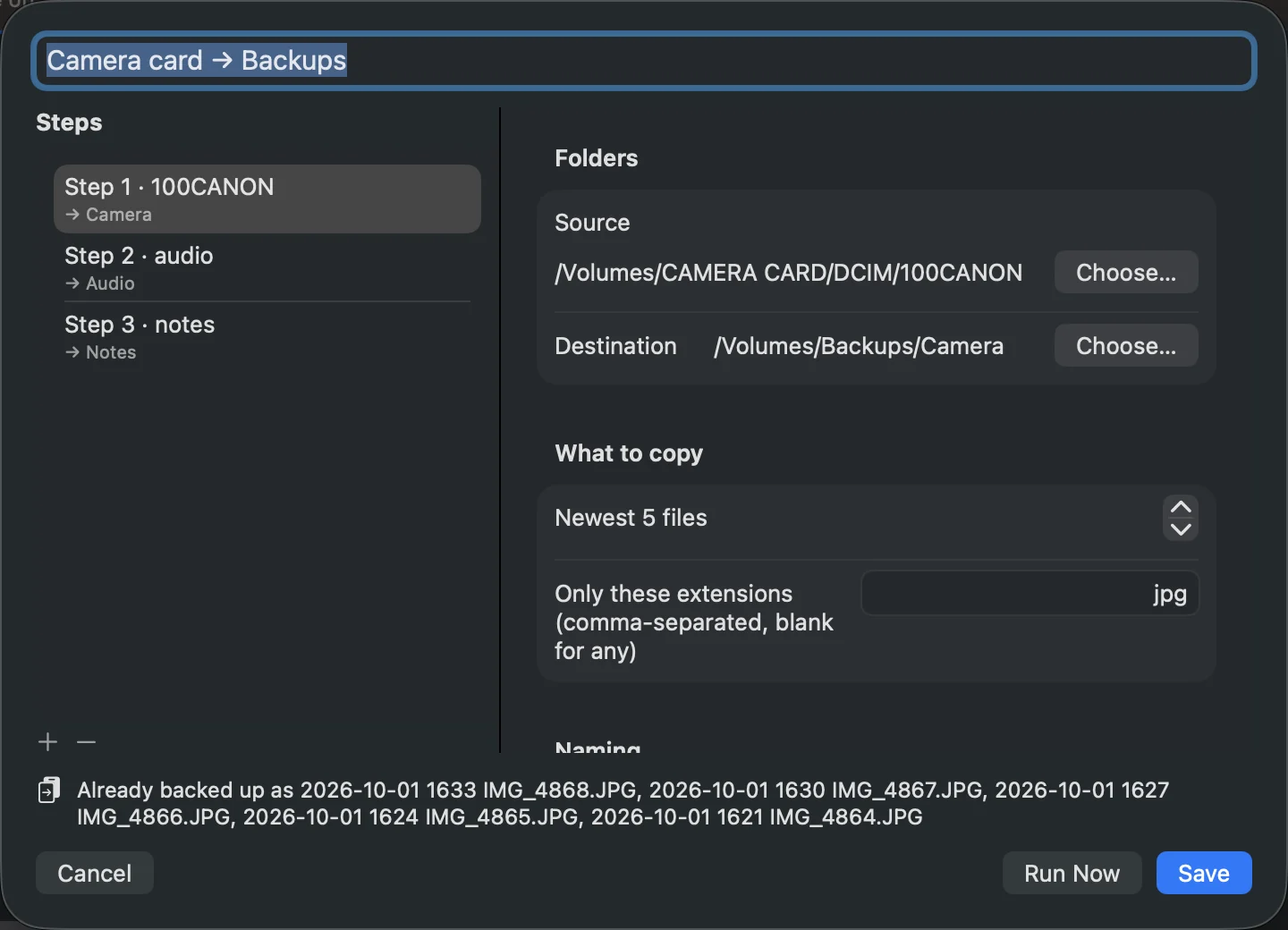
A quick action takes the newest files off a card in one click. It is a named list of steps: source folder, destination, how many newest files to take, which extensions count, and the naming, which puts a date stamp in the format and position you choose in front of the original name. It skips what it has already backed up, and says which files those were.
Replace keeps the original
Paste or copy over a file that is already there and Harbour moves the old one to the Bin, or the NAS share's #recycle folder, before the new copy goes in. Undo puts the original back. On a share with no recycle folder, Harbour asks before replacing anything permanently.
Activity, with Undo
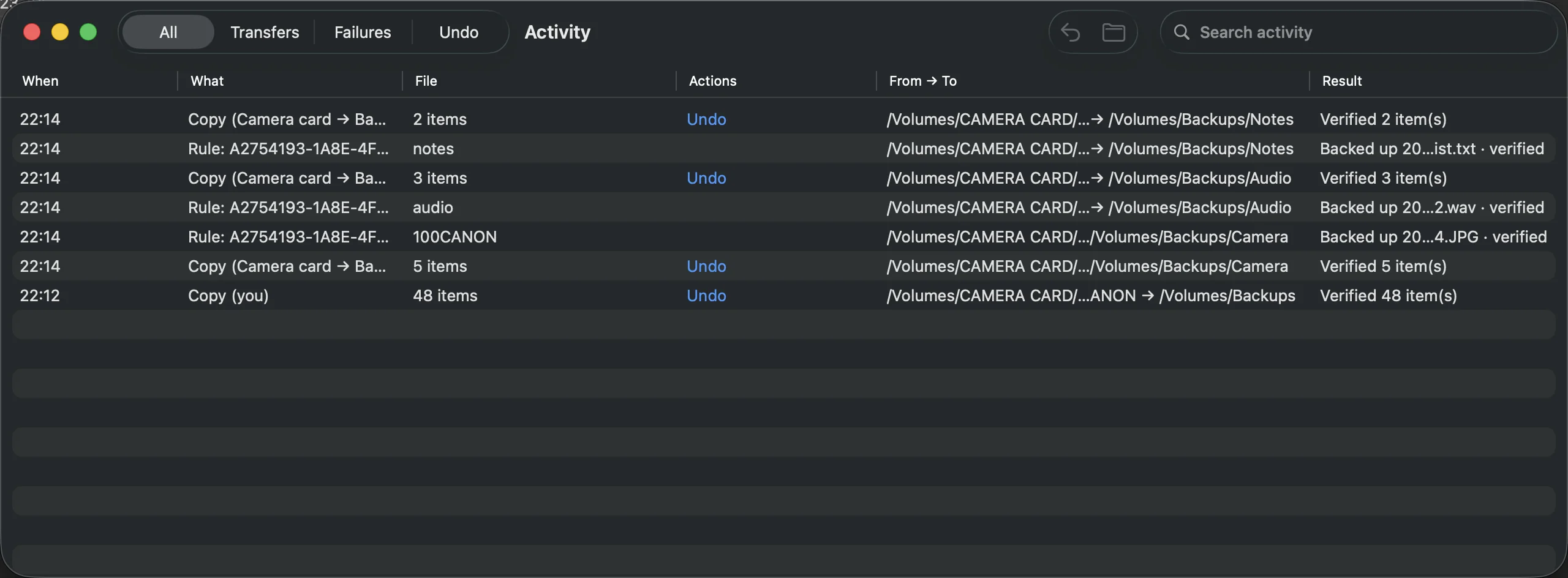
Activity keeps a row for each copy, move, rename, trash, quick-action run, skip and failure: when it ran, the files, where from and where to, and the result (Verified 48 items, or the reason nothing happened). Filter by Transfers, Failures or Undo, search it, and press Undo on the row itself.
Batch rename
Stack rename rules in whatever order you drag them into: find and replace (plain or regex), prefix, suffix, running numbers with padding, a template built from {name}, {ext}, {n} and the modified date, and a case change. The preview shows every old name beside its new one as you type, and flags a collision before anything moves.
NAS-safe browsing
Harbour does not ask network volumes for thumbnails or Spotlight metadata, which is what stalls Finder on SMB. Listings are read per directory on a budget, junk folders like #recycle and @eaDir are skipped outright, and a directory that stops answering is abandoned rather than left to hang the app.
Weighing it up? See how Harbour compares with Finder, ForkLift, Path Finder and Hazel, or read the guides: compare two folders, tidy Downloads automatically, rename receipts automatically and check copies in Terminal.
Questions
Can Harbour rename receipts automatically?
Yes, from version 1.4. Give a folder rule smart naming and it reads each receipt or invoice and renames it from pieces you arrange: date, shop, type and total, and optionally the total excluding VAT, the VAT and the order number, for example 2026-10-14 Amazon receipt £23.99.pdf. It reads PDF text, and photos and scans through on-device text recognition. Add the condition Looks like a receipt or invoice so the rule only acts on receipts. By default it asks before renaming: one notification, and a Review window where you can check and edit what it read. See how to rename receipts automatically on a Mac.
Does Harbour send my documents anywhere?
No. Smart naming uses Apple's on-device model, so a receipt is read on your Mac and is never sent to FableForge, Apple or anyone else. What it learns from your corrections stays on your Mac too. Harbour never sends file names or contents anywhere; the only things it fetches are the update feed and, for a licensed copy, a daily licence check. See the privacy notice.
Do I need Apple Intelligence?
Only for smart naming. It needs Apple Intelligence turned on in System Settings, on a Mac that supports it, in a language and region Apple Intelligence supports. Harbour downloads nothing extra: macOS downloads Apple's model when you turn Apple Intelligence on. Without it, smart naming is greyed out with the reason, and everything else in Harbour works as normal.
What if it reads a receipt wrong?
It never makes a value up: every date, shop, total and order number must appear in the document's own text, or it counts as missing, and a file with anything missing goes to Review with the gap highlighted. Fix a shop name (AMZN Mktp UK to Amazon, say) or a type word and the rule remembers it for next time. After ten approvals in a row from one shop with no changes, Harbour asks whether to stop asking about that shop; only your yes changes anything.
How do I automatically sort my Downloads folder on a Mac?
Free options are Finder (View > Use Groups, grouped by Date Added) and a Shortcuts folder automation on macOS 26, which you build step by step. In Harbour, open Window > Rules (⌃⌘R) and make a rule for Downloads: which files (for example disk images or screenshots), how long they wait (say three days after they arrived), and what happens (move to a folder, rename with a date stamp, move to the Bin or add a tag). A live preview shows what it would do first. Our Downloads guide compares every option, including Hazel.
How do I compare two folders on a Mac?
Finder cannot do it. In Terminal, diff -rq folderA folderB lists files that differ or exist on one side only, and rsync -rvn --delete folderA/ folderB/ does a dry run that lists what a backup is missing. In Harbour, open the two folders in its panes and choose Go > Compare with Other Pane: missing, only-on-one-side and different files are lined up by path, with buttons to copy what is missing. See how to compare two folders on a Mac.
Does Harbour work with a NAS?
Yes. It browses SMB shares without asking them for thumbnails or Spotlight metadata, which is what makes Finder stall, skips junk folders like #recycle and @eaDir, and abandons a directory that stops answering instead of hanging. Copies to a share are checked file by file, Folder Compare matches by path, size and date so it stays quick over the network, and a Replace on a share moves the old file to its #recycle folder. Folder rules on a network folder run only when you press Run Now.
Does Harbour verify copies?
Yes. Every file copied to a removable drive, card or network share is hashed at the source and again after writing. A mismatch fails that file, removes the bad copy and is recorded in the Activity log. Copies between two folders on the internal disk are not checksummed by default. To check copies yourself, see how to check a copy matches the original.
Can I undo a copy or a rule?
Yes. Every copy, move, rename and trash has a row in the Activity log with an Undo button, even after the job has finished. Each run of a folder rule is one undoable job there, named after the rule. ⌘Z undoes your own last action, not a rule's background run.
What happens to the old file when I replace one?
Harbour moves it to the Bin, or to the NAS share's #recycle folder, before the new copy goes in, so Undo puts the original back. On a share with no recycle folder, Harbour asks before replacing a file permanently.
Do folder rules run when Harbour is closed?
No. Rules run while Harbour is open, and rules on network folders run only when you press Run Now. If you want filing to carry on in the background with no app open, Hazel is the better tool, and our comparison page says so.
Which Macs does Harbour run on, and what does it cost?
macOS 26 Tahoe on Apple silicon. It is £19 once, including every 1.x update, with a free 14-day trial of every feature and no account. It is notarised by Apple.
Pricing
- Price
- £19, one-time. Includes every 1.x update.
- Trial
- 14 days, every feature, no account.
- Requirements
- macOS 26 Tahoe, Apple Silicon. Smart naming also needs Apple Intelligence turned on.
- Privacy
- No analytics, no telemetry, no account. Smart naming reads documents on your Mac with Apple's on-device model and sends them nowhere. Update checks fetch one file from this site, and a licensed copy checks once a day that its purchase wasn't refunded, sending only the licence key. Privacy policy.
- Payment
- Handled by Paddle, our merchant of record. UK prices include VAT; in some other countries local tax is added at checkout.
- Refunds
- 14 days, no questions. How refunds work.
Download Harbour 1.4
Already bought? Your key is in your receipt; lost it? Recover it here.